If you’re looking into the AgentMail API, you’re probably trying to figure out whether it can power email for AI agents in a reliable way.
As a founder, you want to know how inboxes are created, how messages are sent and received, what’s automated, and how much engineering work you actually need to do.
In this breakdown, we explain how the AgentMail API works, what features it provides out of the box, how it compares to traditional email systems, and what types of agent use cases it supports.
By the end, you’ll know whether the AgentMail API fits your product roadmap before you commit engineering time.
Key Takeaways
Use Mailforge to get cold email ready fast, without dealing with technical setup.
AgentMail is an email provider that lets AI agents send, receive, and reply to emails using an API.
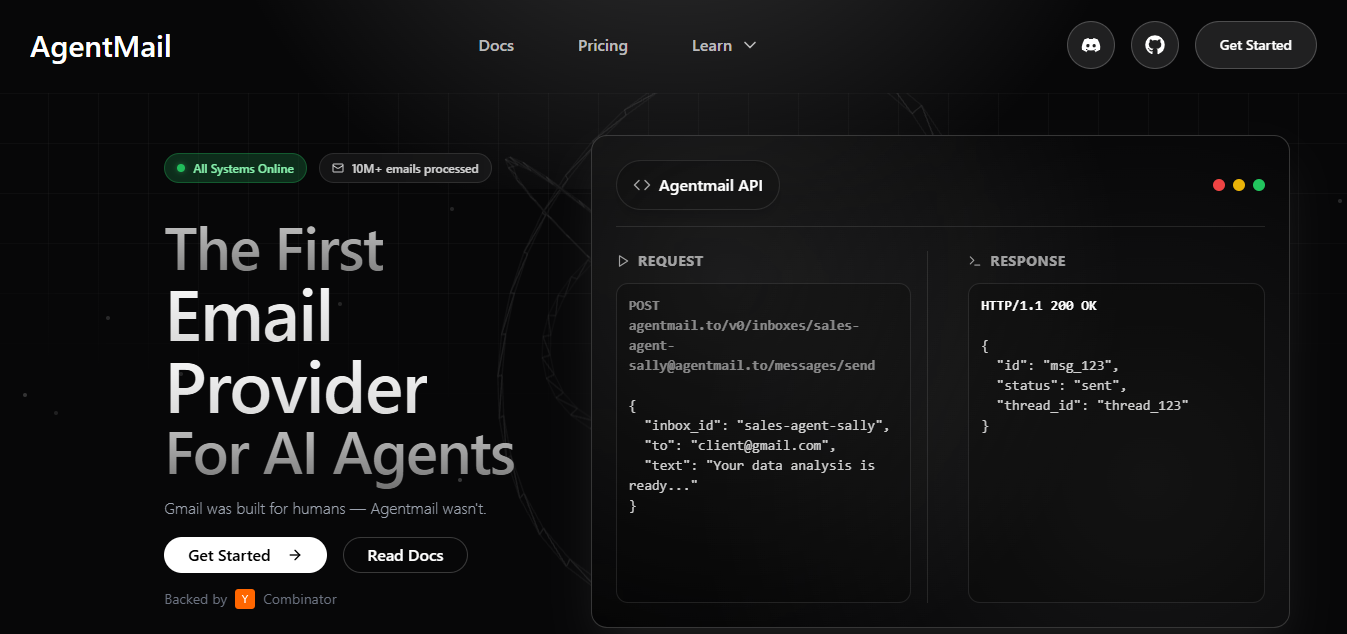
Each agent gets its own inbox.. Once it is set up, the agent can read emails, send replies, and continue email conversations without opening a normal email app.
AgentMail also handles the basic email setup needed to send messages. It supports SPF, DKIM, and DMARC, so email identities work without extra steps.
AgentMail API lets AI agents create inboxes and work with emails.
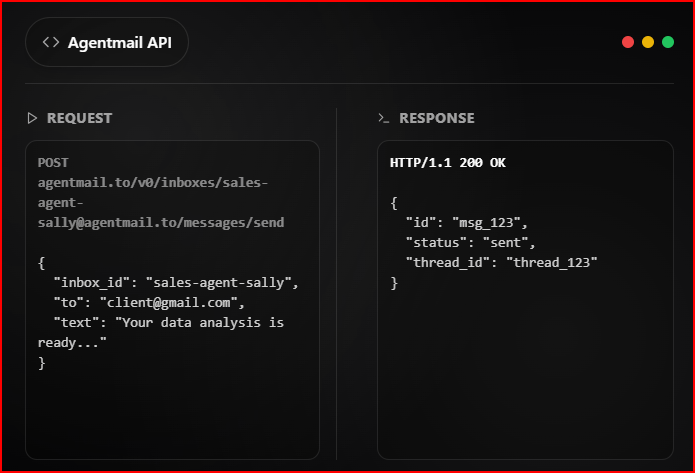
You start by creating an inbox using a username and a domain.
Once the inbox is ready, it can send emails, receive messages, and reply to existing emails.
Each action is done by calling the API with details like the inbox ID and message ID.
The flow is simple. An inbox is created first.
That inbox is then used to send emails or reply within the same conversation.
Messages stay grouped in threads, so agents can continue the discussion.
AgentMail can be used with different SDKs and tools:
All parts of AgentMail work through the API.
There is no inbox to open in a browser.
Inboxes, messages, and replies are all managed through code.
Here is what you can do with AgentMail API:
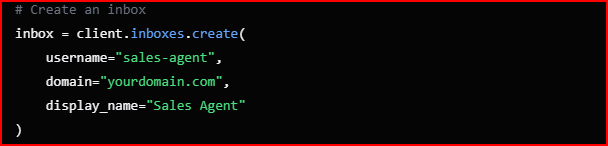
You can create inboxes for agents using the API. Each inbox belongs to one agent and is used for all email activity.
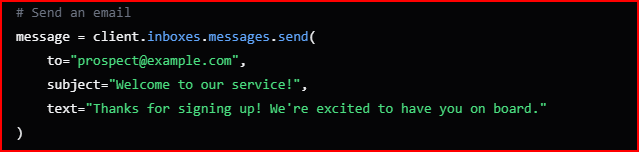
Agents can send emails from their inbox.
Sending is done through the API using the inbox details.
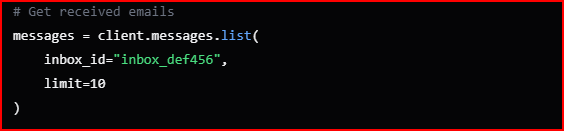
When someone sends an email to an agent inbox, it is received through the API.
Agents can read these incoming emails using code.
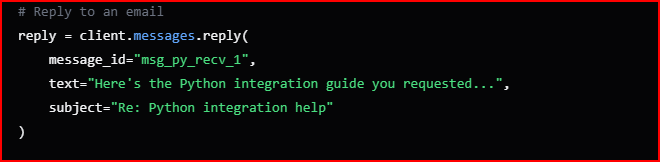
Agents can reply to emails using the same inbox.
Replies stay linked to the original email.

AgentMail keeps emails grouped as conversations. This helps agents continue the same email discussion without starting over.
AgentMail stores email data without a fixed time limit.
Inboxes, messages, and conversations remain available through the API.
These are the main email actions AgentMail API supports.
Here is how AgentMail handles email delivery and agent email identities.
AgentMail provides global, fault-tolerant email delivery.
This means email sending and receiving are handled at a global level and are designed to keep working even during issues.
AgentMail also includes built-in support for:
These are applied automatically to agent inboxes.
You do not need to set them up separately for each inbox.
Email delivery is part of the API flow.
Once an inbox is created, sending and receiving emails works through the API without extra setup.
Each agent gets its own email identity.
This identity is used whenever the agent sends or receives an email.
AgentMail does not use MFA or OAuth flows for these identities.
Agents work with email directly through the API.
This means email identities are fully managed through code, not through a human inbox or login screen.
AgentMail allows you to use custom domains for agent inboxes.
This lets you:
Domains and inboxes are created and used programmatically, without a separate email interface.
Overall, AgentMail combines delivery and identity into the API, so agents can send and receive emails without manual configuration.
This section focuses on how developers access AgentMail API and how it fits into existing tools.
AgentMail API is designed to be simple to use.

Access to the API is done using API key authentication.
Once the API key is added, developers can start making requests to create inboxes and work with emails.
AgentMail also supports:
These options allow AgentMail to stay connected with agent systems as emails are sent and received.
AgentMail provides multiple ways to work with the API, depending on the setup you are using.
It supports:
AgentMail also works with agent and AI frameworks, including:
This makes it easier to plug email into agent workflows without changing the existing tool stack.
AgentMail API can be used when agents need to handle cold emails on their own.
AgentMail shows sales development agents as a clear use case.
These agents use email to reach out to leads and follow up with them.
With the API:
This makes it possible for agents to handle cold email conversations from start to follow-up using code.
Customer support agents can also be used in cold email-style flows.
Agents receive emails, read the message, and send replies through the same thread.
This works well when email conversations need to stay organized and handled automatically.
AgentMail supports setups where many agents are active at the same time.
Each agent can have:
Agents can send emails in parallel and manage their own conversations through the API.
This section explains how AgentMail scales as usage grows.
As you add more agents, you can create more inboxes through the API.
Each inbox belongs to a single agent and works independently.
Inbox creation follows the same API flow, even as the number of inboxes increases.
When email volume grows, agents continue to send, receive, and reply using the same API calls.
There is no separate setup needed when email activity increases. The workflow stays the same.
AgentMail supports setups where many agents run at the same time.
Each agent has:
All agents operate through the same API structure.
AgentMail offers simple pricing plans that grow as your number of agent inboxes increases.
Includes 3 inboxes, up to 3,000 emails per month, and 3 GB storage.
Includes 10 inboxes, up to 10,000 emails per month, 10 GB storage, and 10 custom domains + email support.
Includes 150 inboxes, up to 150,000 emails per month, 150 GB storage, 150 custom domains, dedicated IPs, SOC 2 report, and Slack channel support.
Includes everything in Startup plus custom email volume pricing, white-label platform, your own cloud deployment, and OIDC/SAML SSO.
When you compare AgentMail with traditional email APIs, the key difference is who the email system is meant to work for.
AgentMail is built around AI agents using email through code.
Traditional email APIs are usually built either for people using inboxes or for applications sending emails.
This changes how inboxes are created, how emails are handled, and what email is actually used for.
This table explains that clearly.
This is where AgentMail can feel limiting:
Mailforge is a cold email infrastructure platform built to help teams send cold emails at scale with good deliverability.
It focuses on the infrastructure layer of cold email. This includes:
Mailforge is for human-led cold email workflows, where sales teams or agencies manage outreach, replies, and follow-ups.
AgentMail is designed for systems where email is handled by AI agents.
It works well when inboxes, messages, and replies are part of an automated agent flow.
At the same time, AgentMail follows an API-only approach.
There is no inbox to open, no visual dashboard, and no built-in reporting.
This means it fits better in developer-led setups where email does not need human handling.
For cold email use cases, where people manage outreach, domains, and mailboxes, the requirements are different.
In those setups, infrastructure tools like Mailforge which supports human-managed cold email workflows with infrastructure built for deliverability.
Use Mailforge! Get cold email infrastructure ready in minutes, with domains, mailboxes, and deliverability handled for you.